We still see many IT teams relying on VPN, simply because it has always worked. Even though the way people connect to their applications today moved past the point VPN was ever built for. In this blog post, Jan Claes, Business Lead Azure and Senior Azure Cloud Architect at Xylos, explains in technical depth why identity has replaced the network as the real security perimeter. And what changes concretely when you trade your VPN for Microsoft Entra Private Access. This article is written for IT managers and architects who want to understand how it works.

:focal())
Reality check
Compromised VPN credentials were the cause of 48% of ransomware attacks in Q3 2025 (Beazley Security, via HIPAA Journal). Mandiant also found that in roughly one third of the ransomware incidents it handled in 2025, initial access came from exploiting vulnerabilities, usually in common VPNs and firewalls.
The way people work: anywhere, on any device, at any time, is exactly what your perimeter was never built for.
The problem: VPN was built for a world that no longer exists
The traditional model was a castle. Everything of value sat inside the walls: servers, data, employees at their desks. The firewall was the moat, the VPN was the drawbridge, and whoever crossed the bridge was trusted. That logic held, because what was worth protecting really was inside the building. Then the building emptied out. People now work from home, from the airport, from a café, on an iPad, at whatever hour suits them, on devices that are not always their employer’s. The perimeter was not breached, it dissolved. And once your users and your data are no longer inside the walls, defending those walls protects nothing. The only thing that travels with every request, whatever the device or location, is the user’s identity. That is why identity is the perimeter today, not the network.
A VPN grants trust to the network. Zero Trust grants access to an application. That difference is not semantic, it is fundamental: an entirely different security model.
The mechanism: what your VPN actually does
A legacy VPN does not shrink your castle to fit the new reality, quite the opposite. It extends the “inside” all the way to every remote laptop. As soon as a device dials in, it effectively becomes a node on your internal network, with a broad road straight to your infrastructure.
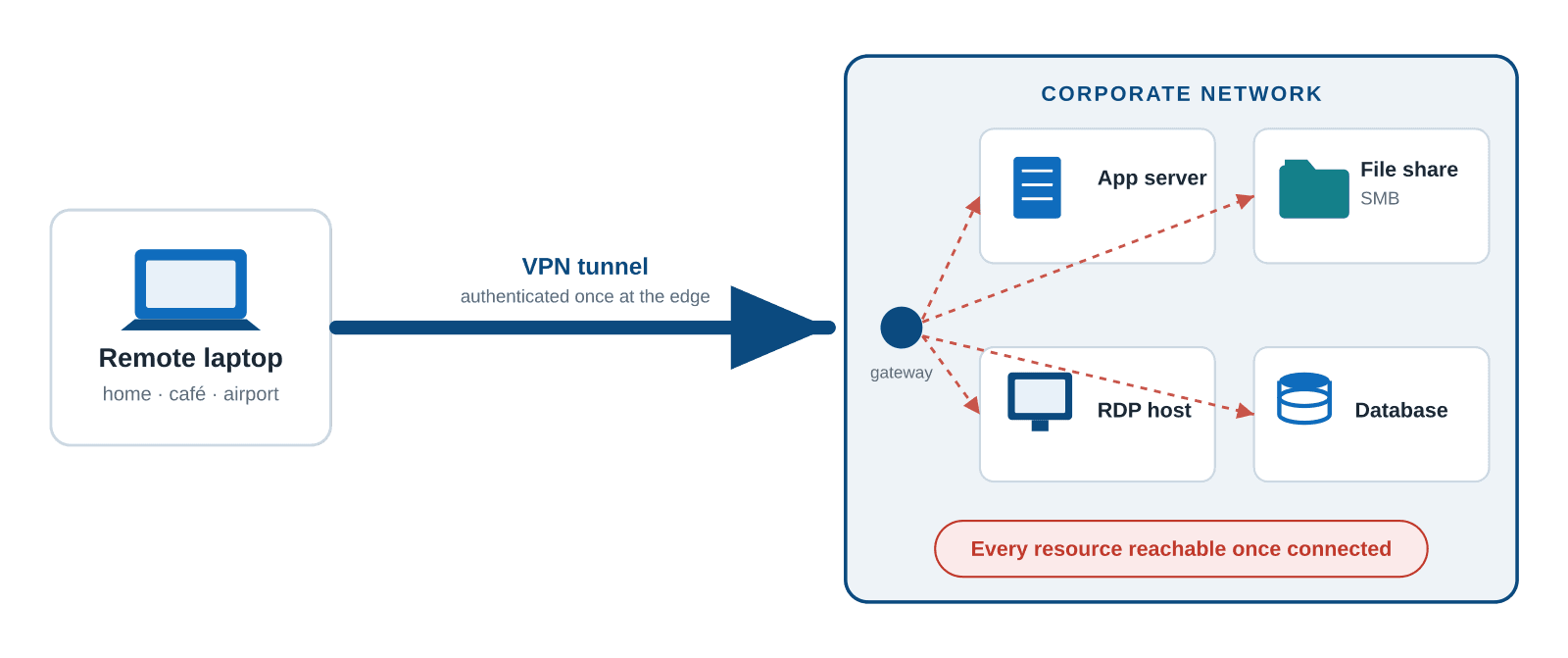
Figure 1: one authenticated tunnel grants broad access to the internal network.
The consequences are structural, not accidental:
Lateral movement. One phishing victim or one compromised laptop is enough: the attacker does not reach an application, they reach the network and move sideways from there to the next target.
A highway for ransomware. That same broad reach is exactly how ransomware spreads from a single endpoint to file shares, servers and backups.
Control at network level, not per app. The VPN verifies you once, at the edge, and trusts you completely after that. It knows that “this device is on the network”, but not which application you are requesting, whether this user should have access to it, or whether the device is healthy.
A target in its own right. Internet-facing VPN and firewall appliances are among the most frequently exploited devices online, with new vulnerabilities every year at practically every major vendor that let attackers bypass authentication.
Giving every remote laptop a VPN tunnel is not locking a door. It is mailing a key to the whole building to everyone who logs in.
The reversal: published can be safer than hidden
Tell an IT manager to publish an app on the internet and they recoil: that sounds unsafe. Put the two models side by side. A web app behind a VPN is protected by one check: did you get onto the network? After that the VPN trusts you completely. That same app, published through Entra ID, is checked again on every request. Single Sign-On with MFA forms the basis, complemented by Conditional Access weighing user, device, location and sign-in risk. The device also has to be managed and compliant, and passwords give way to phishing-resistant passkeys.
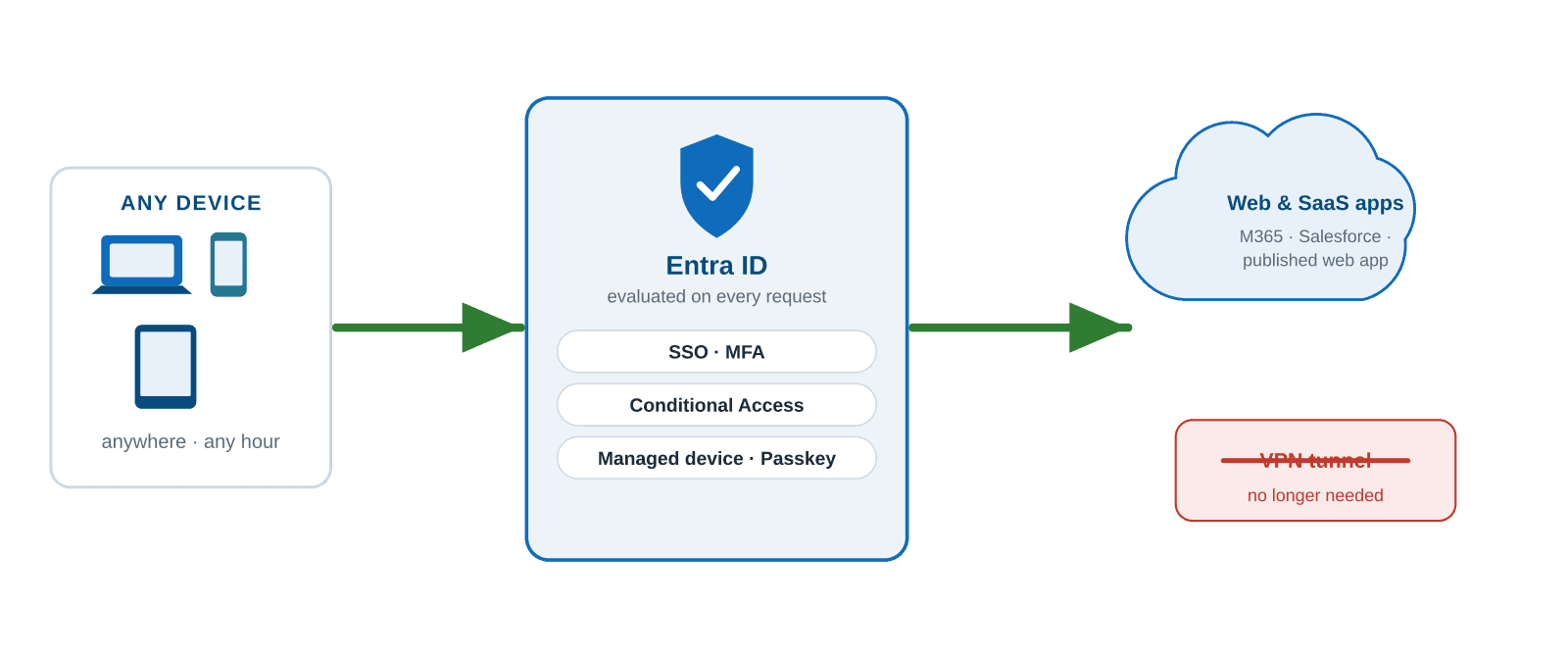
Figure 2: identity-gated publishing evaluates every request; no VPN tunnel needed.
Properly published and identity-driven is at least as safe as a VPN, and often safer.
Legacy VPN | Identity-based access (Entra) |
|---|---|
✗ Broad network access once you are connected | ✓ Access per application, not per network |
✗ Trust based on presence on the network | ✓ Verified on identity, device and risk, on every request |
✗ Device status stays invisible | ✓ Device compliance checked on every session |
✗ Inbound ports stand open to reach resources | ✓ Outbound connector only; nothing inbound to attack |
✗ One breach means lateral movement | ✓ Impact limited to a single published app |
The solution: where Entra Private Access proves itself
Web apps are the easy case. The real value sits in everything you cannot simply publish: legacy client-server applications, SMB file shares, RDP, the old ERP package that will never speak modern authentication. That is exactly where a VPN seems unavoidable, and exactly where Microsoft Entra Private Access, the ZTNA component of the Global Secure Access (SSE) suite, replaces it fully.
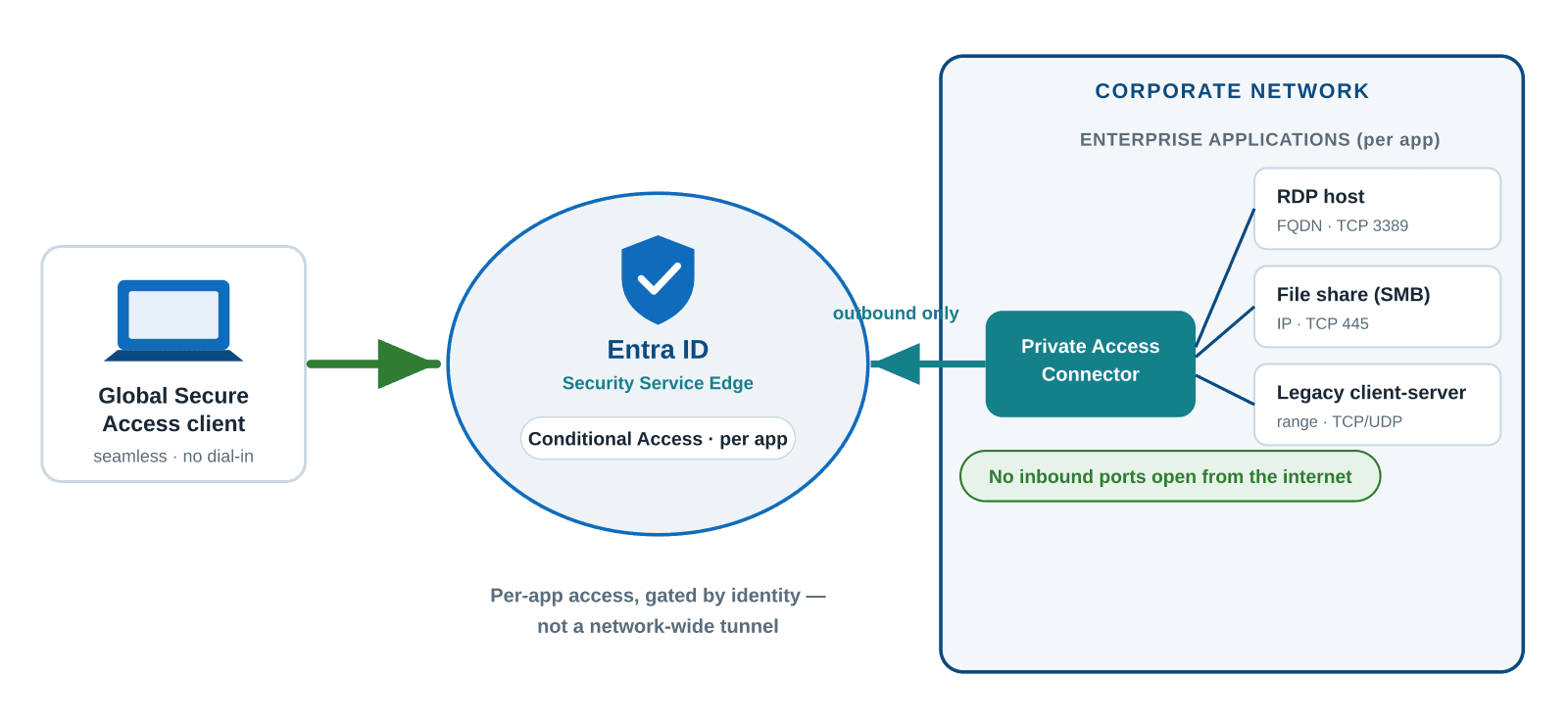
Figure 3: Entra Private Access, a connector that only sets up outbound traffic, with per-app access based on identity.
Outbound traffic only. A lightweight connector in your network only opens outbound connections to the service. You no longer open ports from the internet to your servers or DMZ, nothing inbound is left to attack.
Per app, not per network. Every resource becomes its own enterprise application in Entra, with Conditional Access per app, matched to how critical it is, and per-app access for both TCP and UDP. Least privilege by design.
Seamless for users. The Global Secure Access client runs unnoticed in the background: no dial-in ritual, no more “connect to VPN” step. The resource simply feels present, while access is governed by a modern identity provider.
And you do not have to tackle everything at once. Start with Quick Access to mirror the reach of your VPN and move users off the old client, use Application Discovery to see what people actually use, and then rebuild that into per-app enterprise applications with their own Conditional Access. VPN out, Zero Trust in, wave by wave.
The objection: “But other vendors offer ZTNA too”
That is true, and a fair point. Zero Trust Network Access is a mature category with strong, specialised players: Zscaler Private Access, Palo Alto Prisma Access, Cloudflare Access and Netskope, to name a few. Some are excellent, and for organisations with a strong multicloud landscape or an existing investment in one of these platforms they remain a legitimate choice. This is not a case that Microsoft is the only road to ZTNA. It is about what you already have in house. If your organisation runs on Entra ID and Microsoft 365, as most do, then the identity layer, the policy engine and the admin experience for Zero Trust are already in your tenant. Entra Private Access is not a new platform to implement, it is a capability you switch on:
The same identity provider. Access decisions use the same Entra ID, the same users and groups, and the same Conditional Access policy you already use for Microsoft 365. A third-party ZTNA solution means integrating its policy model with your identity: another system to keep in sync.
The same console, the same team. You manage it from the Entra admin center where your team already works every day: nothing extra to learn, staff or certify.
One client, one agent. The Global Secure Access client is one Microsoft agent, with no extra vendor software competing for resources on the endpoint alongside your existing security stack.
One contract. The licence sits inside your Microsoft agreement: no separate purchase, no new renewal cycle, no extra support relationship.
Every extra vendor you add is another integration point, another attack surface, another invoice and another support line. The most defensible architecture is usually the one with the fewest moving parts. And if you already have a Microsoft environment, that mostly means using the identity platform you have already standardised on. As a Microsoft partner we see the same pattern every time: the choice for Microsoft does not come from brand loyalty, but from the fact that the capability is already in your tenant, ready to be switched on.
The journey: from VPN to Zero Trust in five steps
Map the access landscape: chart which resources are reachable over VPN, by whom, and how sensitive each one is. You cannot secure what you cannot see.
Make Entra ID + MFA the front door: enable MFA for every identity, including administrators and service accounts, and switch off legacy authentication protocols.
Roll out the GSA client with Quick Access: it mirrors the reach of the VPN, so you can validate connectivity and move users onto the new client without disruption.
Segment into per-app applications: use Application Discovery to turn broad access into individual enterprise apps, each scoped to the right users with their own Conditional Access.
Phase out the VPN: once the full portfolio has migrated, you take the concentrator out of service. The most exploited box on your perimeter simply stops existing.
What you need and what it costs.
Requirement: Microsoft Entra ID P1 or P2. Note: Microsoft 365 E5 does include P2, but not Private Access, a common budget surprise.
Then choose: a standalone Entra Private Access add-on (list price € 4.30 per user/month), or the full Entra Suite (€ 10.40 per user/month, with an annual commitment), which bundles Private Access with Internet Access, ID Governance, ID Protection and Verified ID.
List prices serve only as a budgetary anchor. Confirm current pricing for your region and agreement. Set against the licence, hardware and operational costs of a legacy VPN, the sum usually works out in favour of consolidation.
The essence: identity is the new perimeter
Zero Trust is an architecture you adopt. Entra ID, Conditional Access and Global Secure Access make it operational, without having to string together point solutions from a dozen vendors. So the question for every IT manager is not “does our VPN still work?” It is a harder one: are we truly secure in the way we deliver our applications to our users? Do we support how people actually work today: anywhere, on any device, at any moment? Are you still defending a castle whose walls collapsed years ago? If that question gives you pause, a conversation is worth having.
Talk to Xylos
We help organisations phase out legacy VPNs and move to identity-based access with Entra Private Access, including assessment and phased rollout.