At Xylos, our consultants have been working hands-on with the Intune Suite since its initial launch. We tested the features extensively, validated deployment scenarios and defined best practices to help our customers get the most out of their endpoint environment. With Microsoft now integrating parts of the Suite into E3 and E5, we created a clear overview of what you can expect and how to prepare.
What’s new for the Microsoft 365 E3 license?
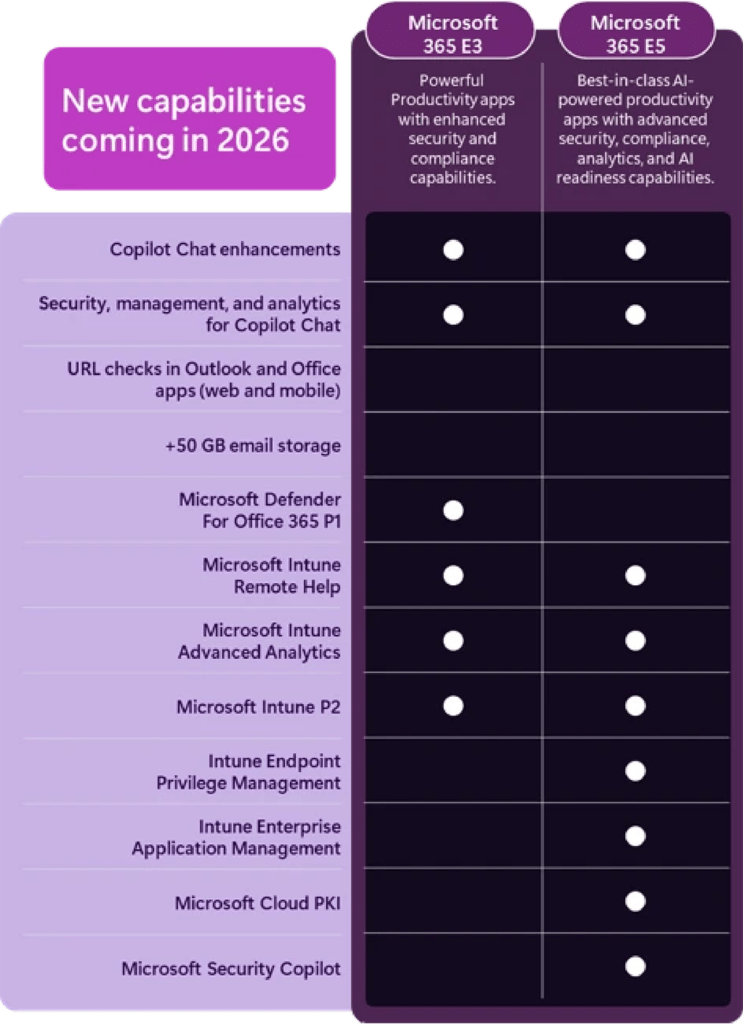
If you have a Microsoft 365 E3 license, you will soon gain several capabilities that previously required additional Intune Suite licensing. These features will ease device management and strenghten security.
Intune Remote Help
A cloud-based solution for secure help desk connections, directly integrated with Microsoft Intune and Entra ID.
Intune Advanced Analytics
Provides deep insights into end-user device health, such as battery performance, startup times and reliability metrics — enabling proactive optimisation.
Tunnel for Mobile Application Management
A lightweight VPN solution for personal mobile devices, allowing secure access to on-prem applications without requiring full device enrollment.
Specialty device management & firmware updates
Support for niche or ruggedised devices combined with centralized, over-the-air firmware lifecycle management.
What’s extra for Microsoft 365 E5?
If you’re on an E5 license, you will get everything above plus advanced security and automation capabilities.
Endpoint Privilege Management
Allows standard users (without administrator rights) to complete tasks that require elevated privileges, with just-in-time access – reducing the attack surface.
Enterprise Application Management
A Microsoft-maintained application catalog that simplifies packaging, updating and deploying business applications.
Microsoft Cloud PKI
A cloud-based service that simplifies and automates certificate lifecycle management which can be used to securely authenticate your clients or users to a VPN or Wi-Fi.
When will these features be available?
Microsoft will start rolling out these changes in 2026. Organisations will receive a 30-day notice in the Microsoft 365 admin center before roll-out begins.
This blog post was written by Michiel Raman, Senior IT Consultant Modern Workplace at Xylos.