This is the second article in our blog series on AI integration in the Microsoft environment. In the first part, we described how AI wild growth has become the new reality: employees experimenting without central direction, and pilots multiplying unmanaged. The question this raised: how do you channel that energy into a platform that is secure and scalable? The answer starts closer to home than most teams expect.
Why Power Platform is the most underrated AI bridge
Power Apps, Power Automate and Dataverse are booked in many organizations as low-code tooling for process automation. Digitize forms. Building approval flows. Making reports available to people without technical backgrounds.
That’s true. But it is no longer the full story.
The integration of Copilot Studio into the Power Platform has added a fundamental layer: the ability to build AI agents that link directly to the data, processes and systems your organization already has. Not as a loose experiment that you put alongside your existing tooling. As part of the applications that employees open every morning.
A Copilot Studio agent knows who you are, what role you have, what data you have access to, and acts accordingly. That’s not a chatbot. That’s an intelligent work environment built on the structure you’ve already put in place.
What your team already knows is more than you think
One of the most underrated strategic advantages of the Microsoft stack is something almost no one says out loud: the knowledge your team has built is directly transferable to an AI context.
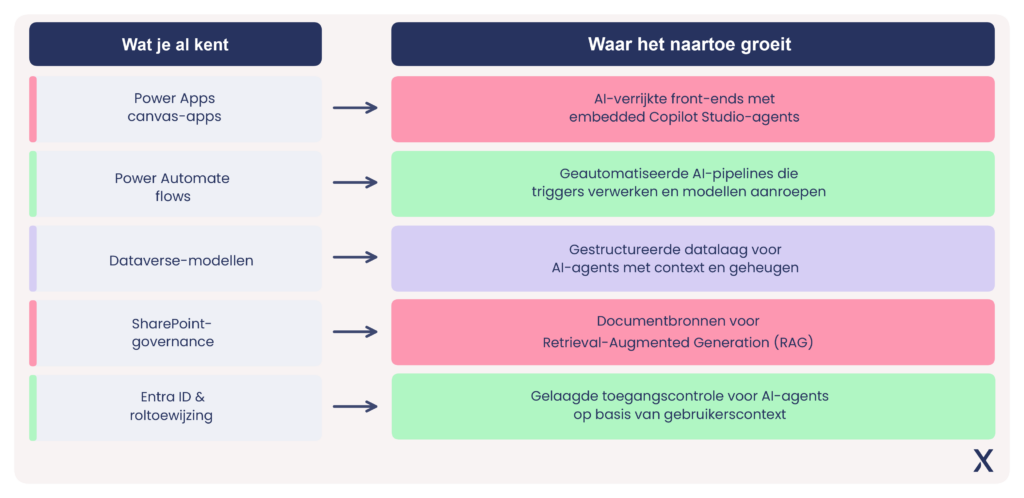
Teams that have worked with SharePoint for years know how document management works in practice. That’s exactly the knowledge you need to feed a RAG pipeline with reliable resources. Teams that build Dataverse models already understand how to organize structured business data. Those are the exact foundations on which an AI agent builds its context and memory. Teams writing Power Automate flows already think in terms of triggers, conditions and actions: the building blocks of automated AI pipelines.
The move from Power Platform to AI agent is not a leap of faith for an experienced M365 professional. It is a logical extension of an architecture that already exists, complemented by components that Microsoft is actively integrating into the same ecosystem. Canvas apps become AI-enriched frontends. Flows become pipelines that call models. Dataverse becomes the structured data layer for agents with context.
The problem is not that the knowledge is lacking. The problem is that no one is making that connection out loud.
What it looks like in practice
Abstract architecture stories only convince when they land in a recognizable situation. Below is a concrete use case we see in organizations in professional services and enterprise IT: automated contract support via an integrated AI agent.
The situation
An account manager is preparing for a customer meeting. She wants to know quickly what the current contract status is, what SLA agreements are running, whether there are any outstanding escalations, and what similar customers have purchased as upsells. Normally, this takes navigating through four systems and half an hour of searching.
The solution
A Power App with an embedded Copilot Studio agent. The account manager opens the customer card, types her question in natural language, and the agent retrieves the relevant information in real-time from Dynamics 365 (contract data), SharePoint (contract documents), Fabric (historical customer data and upsell patterns) and the internal knowledge base.
The answer
Not a raw data dump but a context-aware view: “Contract expires in 47 days. Two open tickets with priority medium. Based on similar profiles, module X is relevant to this customer, three similar accounts have taken this in Q3.”
Under the hood
The Copilot Studio agent uses Retrieval-Augmented Generation (RAG) to retrieve the right documents from SharePoint, combines that with structured data from Dataverse and Fabric, and generates a response via Azure OpenAI, entirely within the secure Microsoft tenant, with no data leaving the organization.
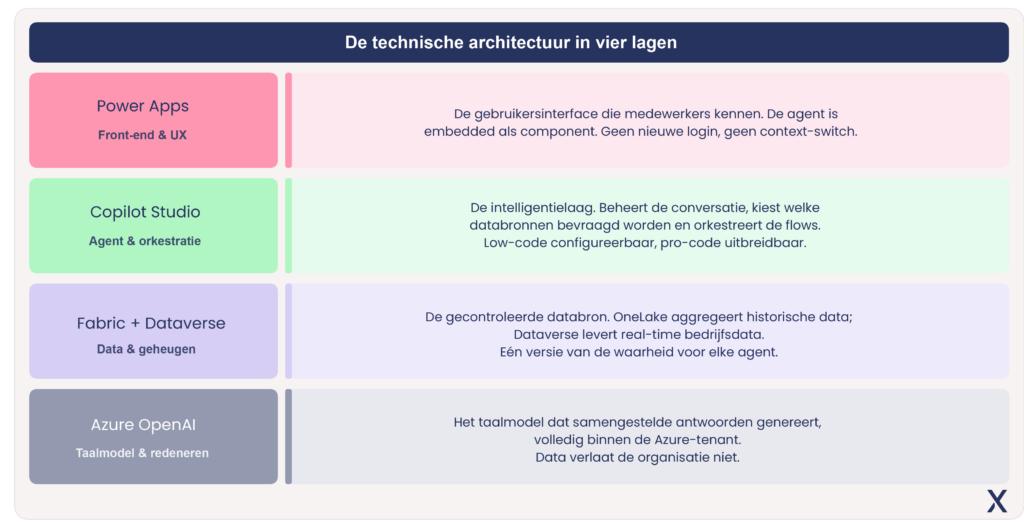
The architecture consists of four layers, and you already know three of them
What makes this possible is a layered build that stays completely within the Microsoft ecosystem. Each layer builds on the previous one, and each layer is replaceable or extensible without disrupting the rest.
Power Apps provides the user interface – the canvas app or model-driven app that employees are familiar with, where the agent is embedded as a component rather than a separate tool that requires you to log in again. Copilot Studio provides the intelligence layer: it manages the conversation, determines which data sources are queried, orchestrates the Power Automate flows that perform actions. Fabric and Dataverse provide the controlled data source, with OneLake as the aggregation layer for historical data and Dataverse for real-time business data. Azure OpenAI generates the final answers, within the organization’s Azure tenant.
Three of those four layers are not unfamiliar territory to an experienced Power Platform team. The fourth, AI orchestration via Copilot Studio, is the new component. And it is, precisely because of that integration, considerably less complex to implement than teams expect.
Why it goes faster than you think
The most common response when I outline this scenario is, “Sounds good, but that takes months, doesn’t it?” In practice, with a team already familiar with Power Platform, a working proof-of-concept is achievable in one to two sprints.
The reason is architectural. Copilot Studio has native connectors for SharePoint, Dataverse, Dynamics 365 and Fabric. No custom API integrations for the most common enterprise data sources. Authentication is via Entra ID, which is already set up. Deployment occurs within the existing Power Platform environment, without setting up new infrastructure.
What does take time, and what is almost always underestimated, is data quality. An agent is only as good as the data it draws on. Before the first agent goes live, the data structure in Dataverse and Fabric must be in order. This is exactly where combining a strong M365 team with data engineers is crucial: the former knows how the organization works and where the data lives, the latter knows how to make that data reliably and scalably available for AI.
Practical tip: Don’t start with the most complex use case. Start with one delineated question that employees ask daily, which is now answered manually by navigating multiple systems. Solve that one question well, and build from there.
This requires more than technology
What makes the contract management agent possible is not just technology. It is the combination of profiles that together understand the architecture and know the business need .
A Power Platform developer building the frontend. A data engineer who sets up the Fabric layer. An AI architect who configures the agent and optimizes the RAG pipeline. And an adoption supervisor who helps the account manager actually use the tool instead of falling back on her old routine.
Organizations with a strong M365 foundation have an advantage here that they rarely exploit. The governance structures are in place. Identity management is in place. Users know the environment. What’s missing is the connection layer: the expertise that connects existing Power Platform knowledge with data engineering and AI architecture that actually scales.
In the next article, we will delve deeper into that data layer: why a solid data strategy makes the difference between an agent that impresses in the demo and one that is still being used after three months.
Want to know if your Power Platform environment is ready for this step? We’ll do a no-obligation technical quick-scan of your current architecture and provide concrete recommendations for the first AI agent use case that will be most beneficial to your organization.
About the author
Peter Verrykt is Data & Analytics Business Lead at Xylos and guides organizations in turning data into concrete business value. He helps companies look beyond technical implementations and use data as a foundation for better decisions, greater agility and sustainable growth.